How to Upload using the Excel Document Uploader
note: the Excel Document Uploader is to help you with ease of uploading products in a bulk...
Click on the "DOWNLOAD EXCEL TEMPLATE" button just beside the "UPLOAD" above.
Use the downloaded excel template to fill in the details of your products. All fields are compulsory.
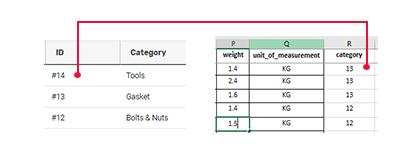
when choosing your category from the list of our listed categories. Just as the picture above, use the ID of the category instead of the category name.
You can leave the fields - width, depth and height as 0(zero) if all you have alone is the weight of a product.
Fill Discount field as 0(zero) if you aren't giving out discount. The discount filled is calculated in percentage(%).
Fill Additional Shipping Cost field as 0(zero) if there are no additional costs.
Don't add symbol in your "unit_price", just fill in the numbers.
Avoid the use of "," for your thousand seperator.
Example:
s/n: 1
name: 51 MM DIXON PREMVIN CLEAR SPIRAL PVC HOSE
manufacturer: DIXON
part_number: ARM050
product_number: NT001
description: 51 MM DIXON PREMVIN CLEAR SPIRAL PVC HOSE
unit_price: 7000.00
discount: 0
quantity: 1000
reorder_stock: 10
additional_shipping_cost: 0
delivery_time_out_of_stock: 7 - 14 Days
width: 0
height: 0
depth: 0
weight: 5.4
unit_of_measurement: KG
category: 3
Your upload will be will be reviewed activated with 3 working days.